Category: Friendly Advice


Over the years I’ve designed a lot of flows inside of Pega software, and a lot of assignment shapes, even a lot of assignment routing configurations. One part of that that generally gets a lot less use relative to other options is Skills Based Routing.

Even when they get discussed, Skills are often discussed to be used to handle “special” or “exception” scenarios, or very specific assignments that require a certain skill in some instances. In my experience, this has meant Skills Based Routing got used very little, if at all, just due to the business not having a need to do so.

Recently, I’ve been getting a lot more use of Skills in a design / implementation, and I have some thoughts as to how to significantly improve the use of skills.

What might you use skills for?

  • When a special certification or training is required to complete this part of this process.
  • When the customer is a VIP, so you only want VIP trained associates to handle the assignment.
  • When a certain level of approval is needed
  • There are many more…

But have you thought of these scenarios?

  • When your teammates are not trained in a standard way, therefore not all teammates are created equal.
  • When legacy systems across many business units have long ramp up times to become proficient.
  • When business context about the work becomes complex, and you get closer and closer to “Segments of One”
  • When N permutations of skills might be required in combination due to that same complex context.

Out off the box, when configuring Skills Based Routing, you have to do a series of things…
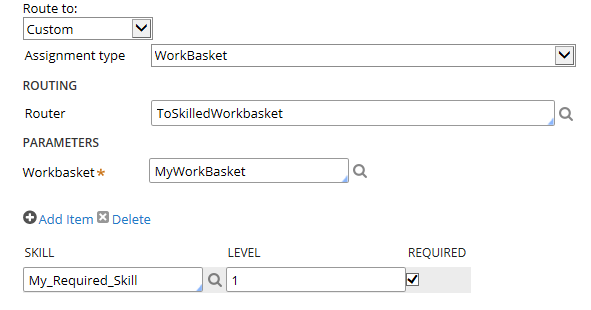
configure_skilled_assignment

  1. Add a new Assignment shape to the flow
  2. Use a custom router
  3. Select the desired skill(s) from a dropdown list

But this presents us with a few limitations.

  1. Every different skill & assignee combination a different assignment shape to add in the flow, create flow decisioning to get to, and then configure your Skills.
  2. Any intelligent or dynamic use of skills has to happen in the flow decisioning logic to “go to” the properly configured assignment shape.
  3. The flow has to be modified anytime this logic changes

This means if I have 4 skills that can be used in any combination of 1-2 then I have 16 different combinations to configure. If I have 3 different teams / workbaskets  it can also be routed to we now have 48 unique routing combinations in this scenario. I don’t want to have to add 48 assignment shapes.

Now imagine having even just 10 legacy systems used across your different business units, and within them 5 completely different ways to perfom the same task due to customer or business context. That’s a lot of ways you’ll need to train employees to use these systems, and therefore, in the real world, sometimes training is done in piecemeal, one “scenario” at a time. This is especially difficult in high-turnover positions that many back office operations teams face. It’s not ideal, but it’s how teams operate until they can get management support to do some disruptive transformation.

Now imagine you have 40 different assignments, multiple of which have the same complex requirements as to which teammates have the correct training to perform the task.

So how do we solve this (besides radical operations / IT transformation)?

We create a custom routing activity of course!

The goal of this activity is to dynamically determine 2 things..

  1. Where to route this work to based on context.
  2. What skill(s) to add to the assignment based on context.

This allows us to take the scenario above down to only 1-2 assignment shapes to configure, and no flow changes even if skills requirements change.

A few notes about what this activity has to do:

  • Do some normal assignment creation stuff, setting all the normal properties, calling NewDefaults, etc…
  • Determine the name of the assignment page that is being created (it differs based on HOW the assignment is created)
  • Call decisioning rules to determine what skills are required, maintain that list. This may require looping through a series of decisioning logic depending on how complex your routing / skills rules are due to the context and systems landscape.
  • Loop through your list of require skills and add them to the assignment page
  • Also potentially dynamically determine where to route this assignment as well, to further reduce the number of assignment shapes required to be configured.


Skills might be one of those things you NEVER even use, or if you do, it’s only for very simple scenarios. I think though, there are more uses for skills that what the average organization uses. Skills can be used to complement your training regimen and give your operations teams additional flexibility on how to get extremenly specific as to the best teammate to complete a piece of work. This has many benefits including productivity of team members, and to customer satisfaction.

In closing, perhaps one day we will see a bit more dynamic / intelligent assignment shape configuration out of the box when it comes to using skills – but at least we can always build our own!

One of the saddest parts of my job is when I hear from clients about #BPMS implementation disasters. Why? Because in almost every case it could have been avoided.  As consultants, we’ve all seen it… The client brings you in to help fight the fire left behind by an already in-progress, or already delivered application that was designed poorly and nobody bothered to tell the client that before they eventually figured it out the hard (and expensive!) way.  It’s just plain sad. While yes, it’s good for me, because I’m getting paid to help, I much prefer to get paid to help prevent such disasters and ensure success in the first place.

While I think this applies to every implementation, it is even more critical on the first or other early implementations while the client is still building their internal skillsets in the BPMS product.

I’ve noticed some commonalities I’d like to share with you:

  1. The clients hired outside consultants for expertise (usually from a single firm)
  2. If design reviews were done, it was by the same group of people who did the design in the first place
  3. Cost played a large factor in choosing which outside firm to bring in
  4. Implementation schedule was often rushed/aggressive (aren’t they all?)
  5. Vendor/Product guardrails weren’t properly followed
  6. Client employees may bring concerns/risks/issues to light, but backed down easily when the consultants reassured them

The above list may not be an exhaustive list of the warning signs for a potential disaster in the making, and may even all hold true for even very successful implementations, but the first key to prevention is awareness!

Let’s take a closer look at each one of these points.

The clients hired outside consultants for expertise (generally from a single firm)

The good news is: Clients are generally pretty good at understanding their own weaknesses, and know when they need to turn to outside help. This is when RFPs fly around, sales teams with polished presentations come in, and their best and brightest pre-sales technical teams come right along with them to amaze you with the speed and power of their skills. For the very first implementation, perhaps they turn to the software vendor itself even. There’s absolutely nothing wrong with turning to outside consultants for help, when needed. Perhaps the company has a standing list of approved contract partners they work off of to bring teams in. But generally, at the end of that process, a single firm is picked to help get the job done.

The bad news is: Clients don’t have the internal expertise in the first place, which also means they may not have the expertise to know if the people they are bringing in are true experts or not.  That same bright pre-sales tech team might not be the same team that shows up for the first day onsite. That’s not to say the team that does show up won’t be bright as well, it just means they are unknown. The client is trusting their chosen vendor to bring in experts, and guide the implementation in the very best way possible.

While being able to trust your vendors and contracting firms is important, until you’ve seen them succeed in your enterprise with the particular kind of task being asked of them, hope and blind faith is not a business strategy! To mitigate the risk of relying on a single outside firm for expertise contributing to a horrible BPMS design, consider using consultants outside from at least two firms. Like going, getting second opinions can be very valuable!

If design reviews were done, it was by the same group of people who did the design in the first place

Design reviews are an important part of your the BPMS governance process, and the Center of Excellence should be involved to some extent. This is critical early on as the team is maturing, because anything designed and built early on, will become the foundation for everything built in the future.  The issue with these problem design reviews were that the same people who did the design were the ones reviewing it, and obviously, no glaring deficiencies are likely to come to light during this process. Unless you are absolutely confident in your teams ability to produce excellent designs, I recommend having them reviewed by a separate team. Perhaps consider bringing in a 3rd party team specifically for these reviews. The cost of a second opinion is a small price of insurance to pay to protect against the implementation of a horrible design.

Cost played a large factor in choosing which outside firm to bring in

Business units & the IT teams that support them are under constant pressure to spend money wisely, and reduce expenses where they can. After spending potentially very large sums on money an a BPMS product, the thought of spending more piles of money on external consultants can be a hard pill to swallow. Sometimes these pressures cause staffing decisions to be a matter of cost. This can be fatal. Cheaper hourly rates do not necessarily mean cheaper long-term costs, especially in the scenario where you end up paying high-priced experts to come in and fight the fires in the event of a disaster. I’m not saying lower costs resources cannot be found that can do a good job, I’m just saying that it’s less likely, especially in a market such as BPMS implementations right now, and that the old magnums “You get what you pay for” and “Let the Buyer Beware” are in full effect. If you are choosing to go with lower cost service providers, ensure you do your due diligence to understand what the full expertise level of what you are buying is — and everyone you ask will tell you they are experts — you need to find this answer out externally, or via carefully designed interview processes and/or POCs

Implementation schedule was often rushed/aggressive

I’m not sure this needs much explanation, because so often this is the norm rather than the exception. The biggest problem I have with this is that it just amplifies potential issues. There’s less time to review for quality, less time to ensure the right solution is being implemented for long term success, less time to take a step back and see that something doesn’t look right, and — even if you do notice something is wrong, I’ve heard of project managers moving forward with the poor design anyway because they refuse to jeopardize the dates that were previously promised. This only exacerbates the problems in the long run. Agile and iterative methodologies are great when done correctly, but speed means nothing if you don’t do it right!

Vendor/Product guardrails weren’t properly followed

They’re called guardrails for a reason! If your consultants are actively advocating for designs that downplay or break the guardrails, that’s a warning sign. I’ve yet to come across an application that I needed to design a solution that significantly broke guardrails. Even in the instances when I did need to design outside of or bend the guardrails it was done in a very surgically targeted fashion, for a very specific purpose.

Client employees may bring concerns/risks/issues to light, but backed down easily when the consultants reassured them

Again, clients are pretty good at knowing what they don’t know, and knowing what they know pretty well too. If it feels funny and just doesn’t seem right, it probably isn’t. I’ve had clients who brought their concerns up to the previous consultants on multiple occasions and let themselves be satisfied with lengthy elaborate explanations that just confused them, so they let it go. Consultants hone their communication skills and messaging framing mechanisms to a fine art. Communication is a necessary skill for consultants, however, some become great bullshit artists! Remember: consultants are there to serve you, the client, and if something doesn’t feel right to you, don’t just give up at the first sign of resistance.

Recap on helpful practices to avoid this sort of disaster:

  • Like with doctors, sometimes a second expert opinion can be a lifesaver. Bring in multiple firms to work together if you can.
  • Design reviews should be done by someone(s) other than who did the design. That’s why it’s a review! These people should be your top experts in the product.
  • You get what you pay for, and design is not a place to skimp. Production support, small enhancements maybe, but please not on your whole design!
  • Take the time to do it right where you can. Lesser experienced teams sometimes take disastrous shortcuts when under pressure.
  • Follow the guardrails given by the product vendor, deviate from them only as rare exceptions, not for the basis of your design!
  • If it walks, talks, and looks like a duck. It’s a duck. Don’t let someone convince you it’s a swan!

If you or your team might be in need of a second opinion for a BPMS design review, or other services, let’s talk and see if I can be of any assistance!

One of the questions clients often ask me, is how can new developers to Pega learn the product quickly? Or, more appropriately, what skills should they be looking for in the people they’d like to move into their Pega practice?

While it’s technically true that anyone is theoretically capabile of learning the product, there are, however, some skillets which I have seen yield better results on average than newcomers without the same skillets. This is not meant to take away from allowing business users to use the system and manage rules –  this is geared more towards the technical folks who will be doing the design/development of the application.

The skill I would consider most beneficial when moving into being a Pega System Architect would be:

A strong understanding of Object Oriented Design & Principles (background developing in an OO language helps)

Pega’s product is built on JAVA, and produces JAVA code behind the scenes that is executed at runtime, but this recommendation has less to do with that aspect, and more to do with the overall design of both the OOB rules & class structure, and the designs of applications built within Pega. The idea of objects & their relationships is highly evident within Pega applications. Class Structures, and reusability of objects, attributes (properties), and other rules is carried out via inheritance paths. A good understanding of what an object is, how it relates to other objects, how it inherits properties & actions from its parents is a HUGE help in learning the product, and learning how to design well within it.

Additional skillets that I’ve seen be beneficial are:

  • Understanding of Integration types – Web Services, Queuing Mechanisms, File, HTTP, SQL, etc….
  • Understanding of HTML & XML, and to a lesser extent Javascript & AJAX
  • Understanding of logic. If then else & boolean expressions
  • Understanding of Relational Databases & their components
  • Understanding of Enterprise Architecture, WebApp Deployments/Architecture
  • Understanding of the concept of “work” and business process flows (workflow)
  • Business & Domain knowledge help as well, as it may be turned into data objects and rules within PRPC

As well as general software development basics such as:

  • Understanding of SDLC and various methodologies – especially agile/iterative ones
  • Understanding good design approaches and conventions
  • Understanding troubleshooting & testing techniques

One exercise I’ve found beneficial when training developers new to Pega/PRPC is to design out an application in their native OO language using such things as UML, Entity-Relationship Diagrams, Use Cases and Process flows and then design out the same application in Pega. While the syntax and the “rules” we use within Pega are a bit different, the general design concepts translate over pretty well. For example, within JAVA we have classes with attributes, methods, and constructors – and those classes can extend (or be extended by) other classes. In Pega, we also have a class structure and within each class we have properties, activities, and models. In addition, such things as decision logic (and virtually all structured functionalities) are abstracted out into their own rules within Pega for easy reusability by inherited classes & other rules.

While certainly much more goes into learning Pegasystems BPMS solution, I hope this is a good overview of some beneficial skills  that may help newcomers when first attempting to figure this stuff out!

Here’s 8 tips I’ve assembled over the years of implementing Pegasystems PRPC BPMS, but I think they  apply to virtually any BPMS. While some/all of these seem like pretty standard best-practices – experience and discussions with industry peers has proven to me they aren’t well implemented in practice. I think it’s important to be thinking about each one of these things, and the earlier the better!

Tip #1: Use Out-of-the-Box capabilities for your first development iteration, then demo result to clients (and by clients I mean the business unit/leaders/users NOT IT), only customize or “improve” upon it after you’ve given them a chance to see it and make suggestions, and in-turn provide options. Too often, teams are to eager to dive in and start customizing before showing what the tool can do OOB. Additionally, keep in mind there’s a difference between “customization” of OOB features, and butchering of code. If you must customize, take the time to do it right!

Tip #2: Don’t rush your first implementation. Yes, quick builds can be done. Yes, I know the sales guys told you all kinds of cool stuff and you can do everything you need to do in 6 weeks, etc… However – what you build today will be the foundation of what you build tomorrow. Take the time to pour the concrete and reinforce it correctly before you build the house on top of it, so to speak.

Tip #3: “Later” is not a good time to implement a Center of Excellence, Design/Development guidelines, or to begin thinking about governance and reusable assets. In fact, I’d argue that BEFORE you start development is a great time to put some of this in place. Your ROI will be returned in magnitude down the road by getting this right…

Tip #4: The BPM space is growing, hiring is growing. Also growing: the number of people hired and rushed through poor enablement programs and then sold to clients as experts.  Companies don’t just grow their practice expertise by the thousands by hiring experts who are already experienced – there’s just not that many people with serious experience out there, yet. You hire outside for expertise (I hope), be aware if you’re getting it or not.

Tip #5: Don’t forget standard BPM practice of continuous process improvement for both the application, and your processes that support it. If you don’t have a strategy for this you won’t fully benefit from BPM. In order to do this correctly, you need proper metrics, and proactive measurements. You can’t know where you are if you don’t know where you were, nor can you judge if your changes are truly successful if you’re not measuring the correct criteria.

Tip #6: If you want your BPMS implementation to be successful, get the business highly engaged early in the process and design to let the business really manage their rules from within the application. Too often IT focuses on just delivering the application without thinking about how to truly give the power back to the business users. IT should enable this as a value-add from good design, not dictate a bureaucracy around how and when business can react to market changes.

Tip #7: When designing, be thinking about situational execution, that is, how can you inject flexibility into the design so unpredictable scenarios can be handled by the application you deliver? You can still control the end-to-end process and be flexible where needed, your process is incomplete if it doesn’t handle exceptions well. See my earlier post for a great case study on this. Users ultimately want flexibility, give it to them where you can/should!

Tip #8: Implement automated governance to watch code quality. A good automated governance solution will match code against design/development guidelines and prevent it from being checked into the rulebase if it doesn’t meet those guidelines. In addition, creation of reports and an easy-to-use dashboard/portal can host a wide variety of reports to help ensure quality code is being delivered within your tool. Evolve this over time as design/code reviews, and multiple iterations begin to show you where there are gaps.

I was a curious kid, I read a lot of books, I stuck my finger in light sockets, and I ask A LOT of questions. It was always why does this _______, what does that _________, how come __________, who, what, when where, why, and how. My mother and grandparents did their best to put up with my constant bombardment of questions, they took me to the library to find endless books about endless topics. Sometimes I’d find the answer, sometimes I’d be told I’d figure it out when I got older, sometimes i just forgot about one thing and moved onto ten more.

Today, as a BPM practitioner and consultant, I still find myself asking a lot of questions, just to different people and a different kind of question. Where does the process start? Who does what along the way? When do we know we’ve reached the goal? How can we make improvements? What are you unhappy about with your current system? Why why this proposed solution be a better solution? So on and so forth…

Many people think it’s about knowing the right answers, and while to certain extents that helps…. I think it’s even more important to know how to ask the right questions, and to know who to ask them to. Once you know that, the answers can be determined, but if you don’t know how to ask the right question, how do you know you’re getting the right answers? Furthermore, you only gain the right answers because at one time you asked the right question… How do I do this, How does this work, what happens if I, What have did I learn from this, What can be done better next time, etc…

As a child, success meant knowledge for the sake of having knowledge. It mean learning something new, just because. Success meant simply finding the answers to feed my curiosity. As an adult, and in my profession the real success comes with what I do with the answers I find out, but it’s the questions I ask that help me get there!

So, I’ll leave you with a question. Are you asking the right questions to be successful?

You’ve heard the popular phrase “Nine women can’t make a baby in a month.” I’ve often heard it uttered by the team being asked to deliver on unreasonable expectations when poor decisions by the powers that be led to those decisions being made, and those same powers that be are adding X number of resources to help. Essentially, what the team is saying back is that while the task at hand can be done, throwing more resources at the problem isn’t going to help speed the solution along any faster.

I have my own spin on the phrase and it is that “Nine men can’t make a baby in a month, or even 9 months, nor in any amount of time in the foreseeable future.”

What do I mean by this?

Well the issue of throwing more people at a solution and not getting to it any faster still exists, but now we have a new problem. Not only are we attempting to solve a problem by just throwing resources at it, we’re not even throwing the right resources at it for it to get accomplished at all. If you don’t begin with the right team, you’re not going to get the results you were hoping to get, no matter how positive your outlook, or how insistently you promised your superiors the job would get done.

With knowledge work especially, it’s the people and team you assemble that are going to make or break your solution. It’s not how much money can you, or can’t you, spend. It’s not how much time you do, or do not, have. It’s the people & their skillset that are going to help you to succeed. This is key to being successful.

How is this Relevant?

I cant count the number of projects I’ve been on, been privileged to knowing about, or heard about from various industry peers that have run into this exact scenario on an all too frequent occurrence. I’ve seen medium-to-large BPM software implementations with lofty goals (we won’t get into why the goals are so lofty in this post), with 40+ developers “working” to implement the solution.  In several of these cases, not only was throwing 40 developers on the problem the incorrect thing to do, they didn’t have the correct knowledge or experience to deliver quality results.   The results of having too many people? Well, maybe you spend too much money, have people doing very little at times, and have people walking on top of each other making things confusing. The results of have too many unskilled people and expecting the quality results? Disastrous.

There are only four outcomes of such a disaster:

  1. The entire program is scrapped, wasting millions of dollars of time, effort, and product licensing.
  2. Millions of dollars are spent to correct the situation by bringing in the team that should have been assembled the first time.
  3. The team suffers endlessly, realizing their mistake too late, but not having the right resources to fix it, and they go on supporting a horrible product
  4. Nobody bothers to realize the disaster, or pretends it doesn’t exist and goes on existing long enough to get promoted and start the cycle over again.

Don’t let this happen to you. Ensure you have the right team, with the right tools, in place to be successful – the first time. If you’re not sure if you have the right team in place to be successful, seek out professional guidance from someone you trust to help assemble the team and get it on the right track. Don’t just rely on the sales guy’s finely honed pitched as your litmus test.

A Major Problem…

Determining if you have the right team, first requires you or someone you trust to understand the skills and expertise it’s going to take to solve your issue, and how much work there is involved.  Many times, the company who’s paying for the team to come in doesn’t have the expertise internally, and they are trusting the team they hire to come in and help them. If you don’t have the expertise, just how are you going to verify who you’re bringing in (and all the people they plan to throw your way) have the right expertise?

You can’t hire a team to make a baby unless you understand that it takes a certain amount of time, and a couple of very specific people to do so. The same applies to your BPM implementation. You can’t ensure you’re hiring the right team if you don’t understand the right amount of time and skillsets it will take to be successful. I encourage some upfront investment in education on this point, or at a minimum some outside expertise to help you make the right decisions, even if that individual(s) are only there for this specific task & amount of time.

When you’re paying by the hour, you want to be sure you’re getting your money’s worth and I believe it’s imperative to interview each resource you’re putting on the project just as if you were hiring them yourselves. Ensure they can hold their own when discussing the product or service involved, and have the experience and can speak at length about that detail.

Expertise costs money. Junior resources can be cheap, and the cost savings can be tempting. Don’t fall into the trap of trying to take nine men and make a baby!